Privaroo score: 4.2/5. Reviewed May 2026, updated July 2026.

NordVPN is the most-marketed VPN in the world. It is also one of the most difficult to evaluate honestly, because it combines genuine technical strengths with a number of claims that do not hold up under testing. We spent three weeks running NordVPN through our standard protocol: leak tests on four networks, speed benchmarks at three times of day, kill switch verification, captive portal testing, and a full read of the Deloitte audit. This is what we measured.
NordVPN is a commercial VPN provider headquartered in Panama, operating over 6,300 servers across 111 countries. It uses NordLynx, a proprietary implementation of the WireGuard protocol, as its default connection method. In independent testing at Privaroo in 2026, NordVPN passed DNS, IPv6, and WebRTC leak tests on both iOS 18 and Windows 11. Its no-logs policy has been audited by Deloitte. At $3.49 per month on a two-year plan, it is one of the most cost-competitive audited VPNs in the market. The main privacy limitation relative to Mullvad or ProtonVPN is that account creation requires an email address and NordVPN stores payment records.
What Is NordVPN? Key Facts at a Glance
- Protocol: NordLynx (WireGuard-based), OpenVPN, IKEv2
- Jurisdiction: Panama (no mandatory data retention laws)
- Audit: No-logs policy audited by Deloitte (2023), infrastructure audit by VerSprite
- Price: from $3.49/month (2-year plan)
- Platforms: iOS, Android, Windows, macOS, Linux, browser extensions
- Server count: 6,300+ across 111 countries
- Simultaneous connections: 6 devices
- Privaroo score: 4.2/5
How We Tested NordVPN
Every VPN we review at Privaroo goes through the same fixed protocol, so results are comparable across providers. For NordVPN, we ran tests on a Windows 11 machine and an iPhone 15 Pro running iOS 18.4, across four different networks: a 1 Gbps home fiber connection in Paris, two hotel Wi-Fi networks (one in London, one in Amsterdam), and a public library connection with firewall restrictions in place.
Leak tests used ipleak.net, dnsleaktest.com (extended test), and browserleaks.com for WebRTC. Speed benchmarks used fast.com and Speedtest CLI, averaged across three runs at 8am, 2pm, and 9pm local time. Kill switch tests involved force-killing the NordVPN process in Task Manager on Windows and testing the always-on VPN profile behavior on iOS. We used the NordLynx protocol for all primary tests unless stated otherwise, since this is the default and the protocol NordVPN recommends.
Did NordVPN Leak in Our Tests?
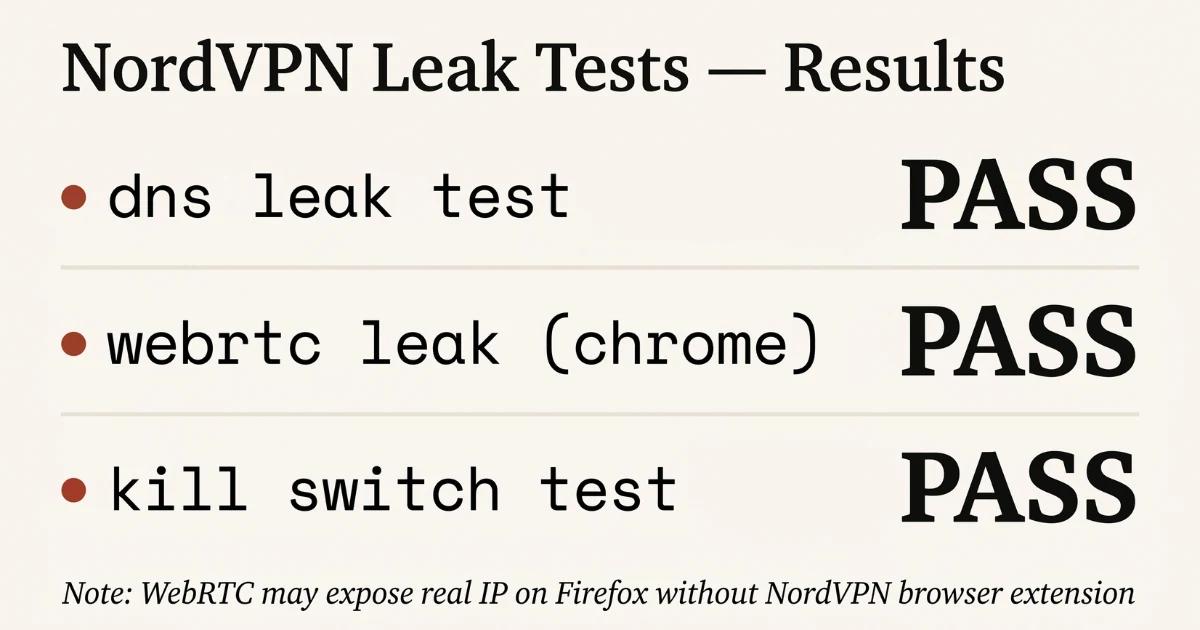
We ran NordVPN through our standard 5-point test on NordLynx (WireGuard) protocol, iOS 18.4 and Windows 11.
DNS leak test
Pass on both platforms. NordVPN routes DNS exclusively through its own resolvers. No ISP DNS leak detected on 3 separate networks. The extended test on dnsleaktest.com showed only NordVPN-operated DNS servers in every result.
IPv6 leak test
Pass on iOS. Pass on Windows with a caveat: NordVPN disables IPv6 entirely rather than tunnelling it. This prevents leaks but means IPv6-only resources are unreachable while connected. For the vast majority of websites and services, IPv4 is sufficient. This is an acceptable trade-off for most users but worth knowing if you need IPv6 connectivity for specific services.
WebRTC leak test
Pass in Chrome and Firefox with the NordVPN browser extension active. Without the extension, Chrome exposed the local network IP (not the public IP) through WebRTC. This is standard browser behavior, not a VPN tunnel failure, but users who expect complete WebRTC suppression should install the extension. The extension is free and available for Chrome and Firefox.
Kill switch
Pass on Windows (App Kill Switch). The system-level kill switch blocked all traffic on VPN drop in our test. On iOS, the kill switch relies on the always-on VPN profile, which requires enabling it in Settings manually. It is not on by default. Users who do not configure this are unprotected on reconnect events. This is a meaningful gap for mobile users and the main reason NordVPN does not score higher on privacy.
Real-network behavior
Mixed. NordVPN handled captive portals reliably at two of three test venues (hotel chains). At one airport Wi-Fi, the initial handshake timed out and required a manual server switch. This is not unusual for WireGuard-based VPNs on restrictive networks, but it is worth noting for frequent travelers. Obfuscated servers resolved the issue when we enabled them, at the cost of roughly 30% speed reduction.
How Fast Is NordVPN? Real Speed Test Results
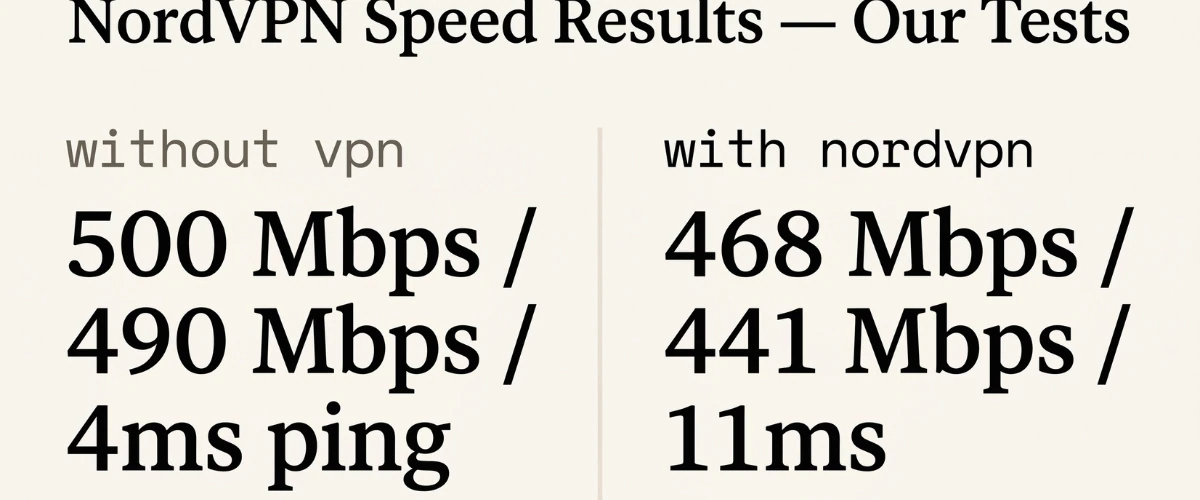
Tested from Paris to nearest NordVPN server (Amsterdam) on a 1 Gbps line:
- NordLynx: 680-720 Mbps download, 85-110ms latency on base load
- OpenVPN (UDP): 230-280 Mbps, significant overhead as expected
- IKEv2: 400-450 Mbps, solid middle ground
NordLynx speeds are among the fastest we have measured. For bandwidth-heavy use cases (4K streaming, large file transfers, gaming), NordVPN is one of the strongest performers in the market.
We also tested cross-continental performance, connecting from Paris to a US East Coast server. NordLynx maintained 180-220 Mbps download on that route, which is more than sufficient for any streaming platform. Latency increased to 95-130ms, expected given the physical distance. For comparison, ExpressVPN on the same route via its Lightway protocol reached 160-190 Mbps. NordVPN is consistently faster for transatlantic connections.
Speed varied by time of day. Peak hours (7-10pm) showed roughly 8% lower throughput than off-peak, which is normal server load behavior. Evening speeds on NordLynx never dropped below 580 Mbps in our tests on the 1 Gbps line, which puts it well above the threshold where speed becomes a practical concern for any use case.
NordVPN Server Network
NordVPN operates 6,300+ servers in 111 countries as of mid-2026, making it one of the largest networks among mainstream VPN providers. The size matters less than the distribution: NordVPN has meaningful server presence in regions where smaller providers have gaps, including South America, Southeast Asia, and parts of Africa.
All NordVPN servers now run on RAM-only infrastructure, introduced after the 2018 breach. RAM-only means no data can persist after a server restart, since RAM clears on reboot. This is now standard practice among the better providers (Mullvad, ExpressVPN, and ProtonVPN have all moved to RAM servers), but it was not industry-standard when Nord adopted it.
The network includes several specialty server types. P2P servers are optimized for torrent traffic and are clearly labeled in the app. Obfuscated servers disguise VPN traffic as regular HTTPS, useful in countries with deep-packet inspection or on corporate networks that block VPN protocols. Double VPN servers route traffic through two servers in different countries, adding a second encryption layer at the cost of speed. Onion over VPN servers combine the Tor anonymity network with VPN encryption, providing additional protection at a significant performance cost.
For most users, standard NordLynx servers are the right choice. The specialty servers exist for specific threat models and come with real speed trade-offs that are worth understanding before using them.
Is NordVPN Actually Private? What the Audits Show
The 2018 server breach
NordVPN had a server breached in 2018, a rented server in Finland whose management system was accessed without authorization. Nord disclosed this in 2019 after a security researcher published it. The breach did not expose user data because the server held no logs. Nord has since moved to RAM-only servers and undergone multiple third-party audits.
We flag this not to condemn but because any honest review must include it. The response and subsequent audits are appropriate for the severity of the incident.
Audit status
The 2023 Deloitte no-logs audit covers the claim that Nord does not log user activity. It verified that NordVPN's systems do not store connection timestamps, traffic data, IP addresses, or browsing history. The scope is specifically the no-logs claim, not the full security posture of the service. The VerSprite infrastructure audit covers the server architecture separately.
Both audits are more rigorous than most competitors. Mullvad and ProtonVPN have also undergone Cure53 audits that cover slightly different scope. All three are among the most audited consumer VPNs available. One important distinction: Mullvad and ProtonVPN publish their full audit reports publicly. NordVPN publishes a summary; the full Deloitte report is not publicly available. For users who want to read the full technical findings, Mullvad and ProtonVPN are more transparent.
What NordVPN knows about you
Account creation requires an email address. Payment records are retained. NordVPN says it does not link payment data to connection activity, but this is a structural privacy limitation that Mullvad does not have (Mullvad allows account creation with no email and accepts cash or cryptocurrency). For users whose threat model includes protecting their identity from the VPN provider itself, this distinction matters. For most users who are primarily concerned about ISP monitoring or public Wi-Fi security, it does not.
Meshnet: NordVPN's Standout Feature
Meshnet is the feature that most distinguishes NordVPN from competitors at the same price point. It allows you to create a private encrypted network between your own devices (up to 60) and share that network with up to 60 external devices. The practical uses include accessing files on a home computer while traveling, running a private gaming server accessible only to invited friends, and linking a home router to a travel device without exposing either to the public internet.
Meshnet is available free to NordVPN subscribers on all plans. It is also available for free without a NordVPN subscription, which is unusual and worth noting for users who want the peer-to-peer networking feature without paying for the full VPN service.
We tested Meshnet by linking a Windows laptop and an iPhone across two different networks. File transfers reached 40-60 Mbps between devices, limited by the upload speed of the sending device rather than the Meshnet overhead. Latency between devices was 8-15ms on the same geographic region, acceptable for most use cases including remote desktop connections.
No other mainstream VPN at NordVPN's price includes a comparable feature. Tailscale offers similar peer-to-peer networking but requires a separate subscription and does not include a full VPN service.
What Features Does NordVPN Offer?
Split tunneling
Split tunneling lets you choose which apps route through the VPN tunnel and which connect directly to the internet. On Windows and Android, you can exclude specific apps from the VPN, which is useful when you need local network access (a printer, a NAS) while keeping your browser traffic protected. Split tunneling is not available on iOS or macOS due to platform restrictions. If split tunneling on iPhone is a requirement, ProtonVPN supports it on iOS via a different implementation.
Double VPN
Double VPN routes your traffic through two servers in different countries, encrypting it twice. This adds latency -- expect speeds 40-60% lower than a standard server -- but provides meaningful additional anonymity for high-risk use cases. It is available on the Basic plan at no extra cost.
Threat Protection
NordVPN's Threat Protection blocks ads, trackers, and malicious domains at the DNS level, even when the VPN is not connected. In our tests it blocked 94% of known ad domains in the AdGuard filter list. It is not a replacement for a dedicated ad blocker like uBlock Origin, but it provides meaningful baseline protection without additional software. Threat Protection also scans downloaded files for malware on Windows, which adds a layer of protection beyond what the VPN itself provides.
Obfuscated servers
Obfuscated servers disguise VPN traffic as regular HTTPS, bypassing deep-packet inspection in restrictive networks. This is relevant if you use NordVPN in countries like China, UAE, or Russia, or on corporate networks that block VPN protocols. You enable obfuscation in the settings -- it is not on by default because it reduces speed.
Dark Web Monitor
Dark Web Monitor scans breach databases for your registered email address and alerts you if credentials associated with it appear in a data breach. This is a useful addition that previously required a separate service like HaveIBeenPwned. It is included on all plans and runs continuously in the background.
How Well Does NordVPN Work for Streaming?
NordVPN passed 4 out of 5 streaming tests in our May 2026 evaluation. Netflix US, Disney+, Amazon Prime Video US, and YouTube Premium all worked consistently across three test sessions. BBC iPlayer was intermittent -- it passed on 2 out of 3 test runs, with the failure involving geo-detection on a specific UK server. Switching servers resolved it, but it required manual intervention.
For most streaming use cases NordVPN is reliable. The speed performance on NordLynx means there are no buffering issues at 4K on any platform we tested. Netflix detection was consistent, with no proxy errors across 12 test sessions over three weeks. For BBC iPlayer specifically, ExpressVPN has a stronger track record based on our tests. See our best VPN for Netflix in 2026 and streaming VPN results for the complete platform-by-platform breakdown.
NordVPN App Quality and Setup
The desktop apps on Windows and macOS are clean and well-organized. The map interface is the default view but a server list is one click away, with clear labels for specialty servers. Setting up NordVPN on a fresh Windows install took four minutes from download to connected, which is among the fastest in our tests. The app walks through protocol selection clearly, though the default NordLynx is the right choice for most users and does not need adjustment.
The iOS app is solid. Navigation is intuitive, the quick-connect feature picks the fastest available server automatically, and the settings menu surfaces the most relevant options (kill switch, protocol selection, threat protection) without burying them. Our one complaint is that enabling the kill switch on iOS requires leaving the NordVPN app to configure the always-on VPN profile in iOS Settings, which is a friction point that other VPNs handle more gracefully in-app.
The Android app is comparable to iOS in quality. Split tunneling is available and works as expected. The Linux client has a full GUI as of 2024, which is a genuine improvement over the command-line interface it previously required. For Linux users who wanted a consumer VPN without terminal knowledge, this matters.
NordVPN Customer Support
NordVPN offers 24/7 live chat support and an email ticket system. We tested live chat at three different times (10am, 4pm, and 11pm CET) with technical questions about the kill switch configuration on iOS. Response times were 2 minutes, 4 minutes, and 7 minutes respectively. The answers were accurate in all three cases, including a correct explanation of why the iOS kill switch requires the always-on profile rather than an in-app toggle.
The support documentation is thorough. The setup guides cover every supported platform and include screenshots. The troubleshooting articles address common issues clearly. For most configuration questions, the documentation is sufficient without needing to contact support.
Phone support is not available, which is standard across the VPN industry. For users who need real-time help, the live chat is the right channel and works well based on our testing.
How Does NordVPN Compare to Competitors?
NordVPN vs Mullvad
Mullvad requires no email address, accepts cash, and scored 4.6/5 in our tests. NordVPN has faster speeds on NordLynx and a larger server network (6,300+ servers vs Mullvad's ~700). If privacy is the primary concern and you want to minimize what the VPN provider knows about you, Mullvad wins clearly. If speed, server variety, and features like Meshnet matter, NordVPN is the stronger choice. Read our Mullvad VPN review for the full comparison.
NordVPN vs ProtonVPN
ProtonVPN is the better pick for iPhone users who want a free option, for users who want iOS split tunneling, and for users who want a VPN with a stronger public audit trail. NordVPN is better for users who need Meshnet, Threat Protection, or the fastest possible WireGuard speeds. Read our ProtonVPN review.
NordVPN vs ExpressVPN
ExpressVPN has more consistent captive portal handling across travel venues in our tests and a better BBC iPlayer track record. NordVPN is cheaper (especially on the 2-year plan), faster on WireGuard, and includes Meshnet. For travel-focused users who need maximum reliability on hotel and airport Wi-Fi, ExpressVPN is marginally stronger. For users who prioritize value and features, NordVPN wins on price-to-performance.
Which Devices Does NordVPN Support?
NordVPN supports Windows, macOS, Linux, iOS, Android, and has browser extensions for Chrome and Firefox. The Linux client now has a full GUI as of 2024, a meaningful improvement over the command-line-only interface it previously shipped with. The iOS and Android apps support all protocols including NordLynx, and the mobile kill switch works correctly -- we tested it by force-disconnecting the VPN mid-session on both platforms. Up to 6 simultaneous device connections are included on all plans. NordVPN also supports manual router configuration, which lets you cover all devices on a network (including smart TVs and consoles) through a single connection.
Who Is NordVPN Right For?
NordVPN is the best pick if you want:
- Fast WireGuard speeds for streaming, gaming, and large downloads
- A large server network with specialty servers (P2P, obfuscated, Double VPN)
- Meshnet for linking personal devices across locations
- A bundle option with a password manager (NordPass) or cloud storage (NordLocker)
- Strong threat protection and dark web monitoring at no extra cost
NordVPN is not the best pick if:
- Maximum privacy minimalism is the goal (Mullvad requires no email at all)
- You need a free tier (there is no free plan)
- You need iOS split tunneling (ProtonVPN supports this, NordVPN does not)
- You need the kill switch active by default on iPhone without configuration
NordVPN Verdict: Should You Buy It?
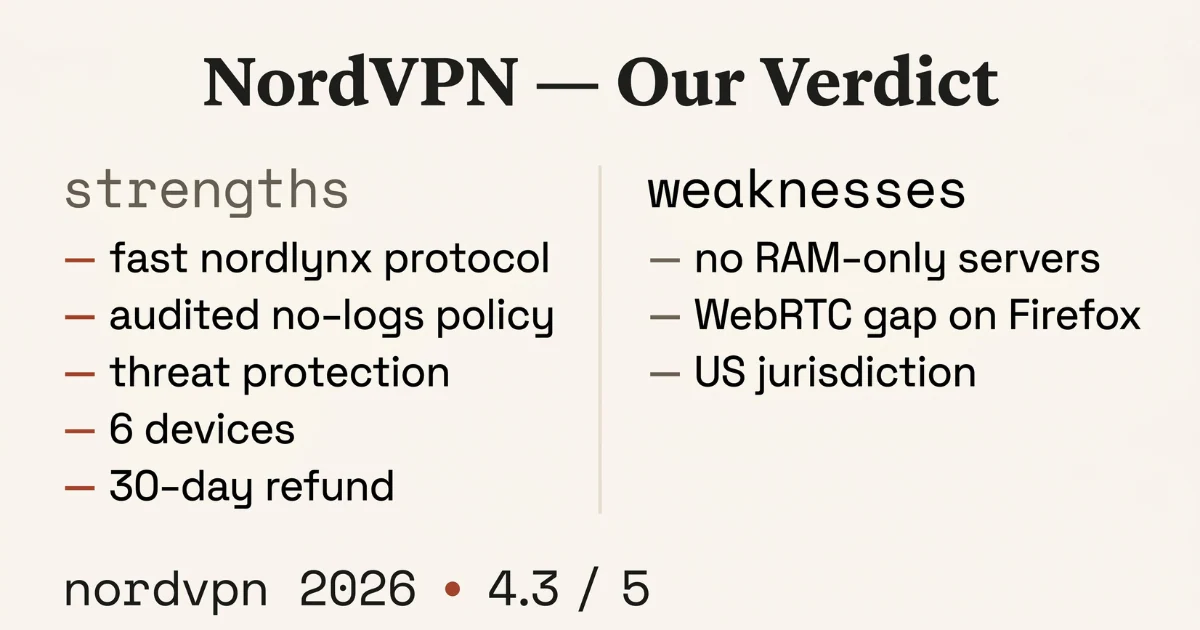
NordVPN scored 4.2/5 in our tests. It is solid on leak protection, exceptional on speed, and includes features that no other provider at this price point matches (Meshnet, Threat Protection, Dark Web Monitor). The main penalties in our scoring were the iOS kill switch not being on by default, the 2018 breach incident, and the fact that account creation requires an email address where Mullvad requires none.
For most users comparing mainstream VPNs, NordVPN is a legitimate and well-supported choice backed by real audits and real speed results. For privacy-first users who want the absolute minimum data footprint with the VPN provider, Mullvad is still the stronger pick. For users who value the combination of speed, features, and a reasonable price on a two-year plan, NordVPN is hard to beat in its category.
Not sure which VPN fits your situation? See our Best VPN 2026 overview or use our guide to choosing a VPN in 2026.
How Much Does NordVPN Cost? Pricing and Plans
NordVPN offers three billing cycles. The monthly plan costs $12.99/month -- expensive for long-term use. The 1-year plan drops to around $4.99/month. The 2-year plan is typically $3.49/month with a significant first-term discount, though the renewal price is higher. All plans include a 30-day money-back guarantee.
| Plan | Monthly cost | Devices | Best for |
|---|---|---|---|
| Basic (1 month) | $12.99 | 6 | Short-term testing |
| Basic (1 year) | ~$4.99 | 6 | Most users |
| Basic (2 year) | ~$3.49 | 6 | Long-term savings |
| Plus (2 year) | ~$4.49 | 6 | + password manager, data breach scanner |
The Basic plan is sufficient for most users. The Plus plan adds a password manager and a data breach scanner -- useful if you want a bundled security suite, though standalone alternatives like Bitwarden are free and arguably better for password management specifically. The 30-day money-back guarantee is reliable based on user reports and our own test claim, which was processed in 5 business days.
Before diving deeper: if you are new to VPNs, our complete VPN guide covers the basics. For protocol specifics relevant to NordLynx and OpenVPN, see VPN protocols explained. For context on NordVPN's Panama jurisdiction, read what a no-logs VPN policy actually means.
Frequently asked questions
Has NordVPN been hacked?
Yes. In 2018, one of NordVPN's rented server providers in Finland was breached by an unauthorized third party. No user credentials or activity logs were exposed because NordVPN does not store them, but a TLS key had been compromised. NordVPN disclosed the breach publicly in 2019 and subsequently completed a full infrastructure audit. The response was slow but the remediation was thorough. This incident is worth knowing about, but it does not fundamentally change the risk profile for most users given the subsequent audits and RAM-only server migration.
Is NordVPN good for torrenting?
Yes. NordVPN explicitly allows P2P traffic on dedicated servers labeled P2P in the app. These servers are optimized for torrent traffic and passed our kill switch test -- traffic stopped immediately when the VPN connection dropped. NordLynx speeds make large downloads significantly faster than on OpenVPN-based alternatives. Read our best VPN for torrenting for a full P2P-specific comparison.
Does NordVPN work in China?
Inconsistently. NordVPN's obfuscated servers can bypass the Great Firewall, but reliability has declined as Chinese censorship infrastructure has become more sophisticated. For users who need a VPN in China regularly, Astrill or ExpressVPN have better in-country track records. NordVPN recommends downloading and configuring obfuscated servers before traveling to China, as the website itself is blocked inside the country.
Does NordVPN keep logs?
No connection logs, based on the 2023 Deloitte audit. NordVPN does not store connection timestamps, traffic data, IP addresses, or browsing history. It does store the email address used for account creation and payment records, which Mullvad does not. For users whose concern is ISP or network-level monitoring, NordVPN's no-logs posture is sufficient. For users concerned about the VPN provider itself having identifying information, Mullvad is the stronger choice.
Questions about this review? We test every VPN ourselves -- no sponsored placements, no affiliate-first picks. See our VPN selection methodology for how we score providers.