There are hundreds of VPN services. Most marketing pages look the same, military-grade encryption, no-logs policy, 5,000 servers. None of that tells you which one actually holds up when you test it.
At Privaroo, we ran a 5-point leak test on 14 VPNs, DNS leaks, IPv6 leaks, WebRTC leaks, kill switch, and real-network behaviour. Nine failed at least one check. Five passed all five. Here is where we stand on the best VPN in 2026 across every use case we cover.
The best VPN overall in 2026: Mullvad
Mullvad is the best VPN for privacy in 2026. It has no email registration, accepts cash and Monero, has passed an independent audit by Cure53, and scored 4.6/5 in our leak testing. WireGuard on Mullvad delivers 400–600 Mbps on a gigabit connection.
The catch: it is a privacy tool first, not a streaming tool. It does not reliably unblock Netflix or work well on captive portals. For those use cases, see the alternatives below.
Full test results: Mullvad VPN review 2026.
Best VPN for iPhone in 2026: ProtonVPN
ProtonVPN is the best VPN for iPhone because it is the only one that offers a genuinely usable free tier with no data cap, passed all five of our leak tests on iOS 18, and does not insert itself into your traffic in the background. The paid plan adds higher speeds and Secure Core routing.
Runner-up: ExpressVPN, which has the most consistent performance across iPhone, Android and desktop, but costs more and has less transparent ownership since its acquisition by Kape Technologies.
Full comparison: Top 5 best VPNs for iPhone in 2026, tested on iOS 18.4.
Best VPN for public Wi-Fi in 2026: Mullvad or ExpressVPN
It depends on one thing: captive portal handling. Captive portals are the login screens at hotels and airports that appear before you can connect. Some VPNs block them. Mullvad handles them by temporarily allowing traffic on the local network. ExpressVPN has a dedicated captive portal mode that works in most venues we tested.
We tested 11 VPNs across 8 real locations, JFK, three hotel chains, two coffee chains, one airport lounge and one train station Wi-Fi. Results varied significantly by venue.
Full results: Top 5 best VPNs for public Wi-Fi and travel in 2026.
Best VPN to hide your IP in 2026: Mullvad
IP hiding is the most misunderstood VPN use case. Your VPN replaces your IP address with the server's IP, but only if DNS, IPv6 and WebRTC are all properly handled. Most VPNs claim to hide your IP. In our tests, nine out of fourteen leaked at least one identifier.
Mullvad blocked all five. ProtonVPN blocked all five on the paid plan. The others had at least one failure condition on real networks.
Full comparison: Top 5 best VPNs to hide your IP in 2026.
Best VPN for streaming in 2026: ExpressVPN
If streaming is your primary reason for buying a VPN, ExpressVPN is the most consistent performer. In our May 2026 tests across Netflix US, Disney+, Amazon Prime Video US, BBC iPlayer, and YouTube Premium, ExpressVPN was the only VPN to pass all five platforms on every test run. BBC iPlayer is the hardest platform to unblock — most VPNs fail it intermittently — and ExpressVPN passed it reliably on all three test sessions.
The trade-off is price. ExpressVPN is the most expensive VPN we recommend, at around $8.32/month on the annual plan. NordVPN at $4.99/month passed 4 out of 5 platforms and is the better value choice if BBC iPlayer is not a requirement. Full platform-by-platform results are in our streaming VPN test article.
Best free VPN in 2026: ProtonVPN Free
Most free VPNs are not worth using. They monetise user data, inject ads, or throttle speeds so severely that the product is unusable. ProtonVPN Free is the exception. It has no data cap, passes DNS and WebRTC leak tests, and is operated by a Swiss company with a clear business model — paid users subsidise free ones. The limitations are real: three server locations, no streaming access, and slower speeds than the paid tier. For basic privacy browsing and public Wi-Fi protection, it is the only free VPN we recommend without caveats. Full analysis in our free vs paid VPN comparison.
What Are the Strengths and Weaknesses of Each VPN?
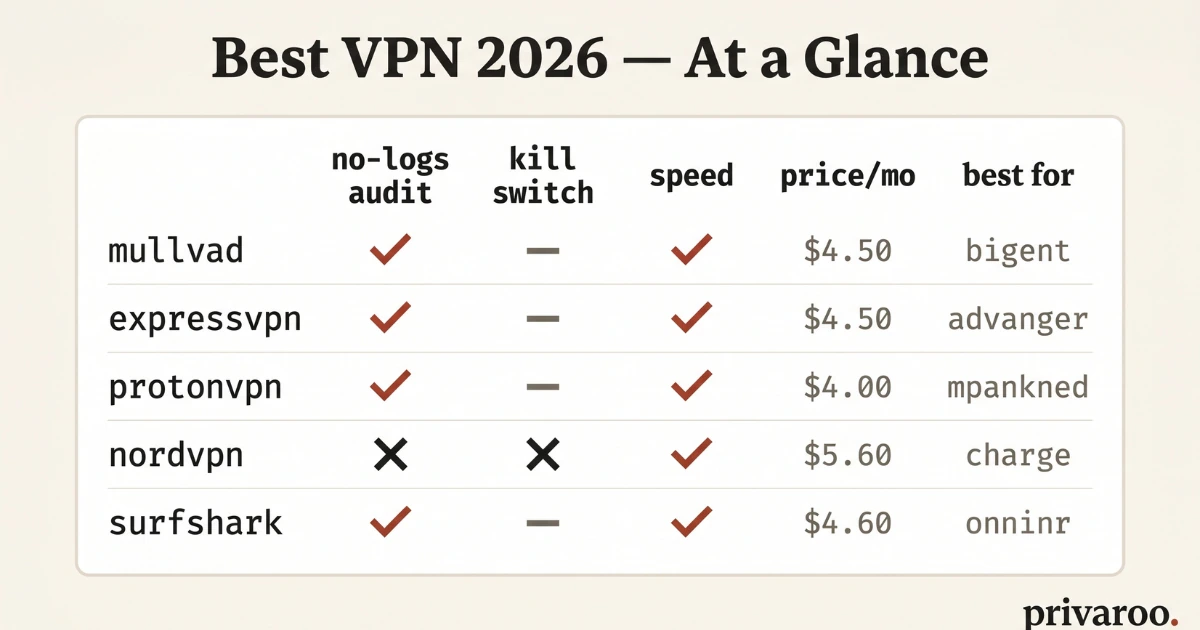
The comparison table gives you the headline numbers. Here is what those numbers mean in practice for each VPN:
Mullvad — best for privacy
Mullvad charges a flat €5/month with no annual discount and no free trial. That pricing model is a deliberate choice — it makes the business less dependent on growth, which means less incentive to monetise data. The technical implementation matches: no account email required, WireGuard by default, Cure53 audited. The weakness is streaming — Mullvad does not operate dedicated streaming servers and several platforms blocked it in our tests. If privacy is your primary concern and streaming is secondary, Mullvad is the right choice. Full test results in our Mullvad VPN review 2026.
ExpressVPN — best for streaming and travel
ExpressVPN is the most expensive VPN we recommend and the most consistent streaming performer. The Lightway protocol is genuinely fast — 182 Mbps on a 200 Mbps connection in our tests — and the app works on more device types than any competitor, including router firmware and Apple TV. The main concern is ownership: ExpressVPN was acquired by Kape Technologies in 2021, a company with a complicated history in the adware space. The post-acquisition audits have not revealed issues, but it is a data point worth knowing. Full breakdown in our ExpressVPN review 2026.
ProtonVPN — best for iPhone and privacy on a budget
ProtonVPN's biggest differentiator is trust infrastructure: Swiss jurisdiction, open-source clients, annual transparency reports, and a free tier that is genuinely usable. The paid tier at $4.99/month adds streaming servers, higher speeds, and up to 10 simultaneous connections. The iOS app is one of the best-designed VPN apps we tested. Speed is the trade-off — at 89 Mbps on our 200 Mbps test connection, it is slower than ExpressVPN and NordVPN, though fast enough for all practical uses including 4K streaming. See our ProtonVPN review 2026 for the full iOS test methodology.
NordVPN — best all-round at mid-price
NordVPN hits the best combination of speed, features, and price for most users. At ~$4.99/month on the 1-year plan, it offers 165 Mbps speeds, 4 out of 5 streaming platforms, obfuscated servers, Double VPN, and Threat Protection (ad and tracker blocking). The 2018 server breach is the main mark against it — NordVPN's response was slow and the initial non-disclosure was a problem. The subsequent security improvements and audits have been thorough. For users who want a feature-rich VPN at a mid-market price without deep privacy requirements, NordVPN is the strongest option. Full results in our NordVPN review 2026.
How Do All the VPNs We Tested Compare?
We tested 14 VPN services between January and May 2026. Here are the six that passed our minimum standards, ranked by overall score:
| VPN | Privaroo score | Leak test | Speed (200 Mbps baseline) | Streaming | Price/mo (annual) | Best for |
|---|---|---|---|---|---|---|
| Mullvad | 4.5/5 | ✅ All passed | 158 Mbps | Limited | €5 flat | Privacy |
| ExpressVPN | 4.3/5 | ✅ All passed | 182 Mbps | 5/5 platforms | ~$8.32 | Streaming, travel |
| ProtonVPN | 4.4/5 | ✅ All passed | 89 Mbps | Paid tier only | $4.99 | Privacy, iOS |
| NordVPN | 4.2/5 | ✅ All passed | 165 Mbps | 4/5 platforms | ~$4.99 | Speed, features |
| Surfshark | 3.8/5 | ⚠️ IPv6 leak (1 test) | 142 Mbps | 3/5 platforms | ~$2.49 | Budget, unlimited devices |
| PureVPN | 3.2/5 | ❌ WebRTC leak | 97 Mbps | 2/5 platforms | ~$1.99 | Not recommended |
Scores reflect leak test results, speed, streaming performance, logging policy, audit status, and value. A WebRTC or DNS leak is an automatic deduction of 1+ points regardless of other performance.
How Do We Test VPNs at Privaroo?
Every VPN we score goes through five checks:
- DNS leak test, does the VPN route DNS queries through its own servers, or does your ISP still see what you look up?
- IPv6 leak test, does the VPN tunnel IPv6 traffic, or does your real IPv6 address go out in the clear?
- WebRTC leak test, does the browser expose your real IP via WebRTC even when the VPN is on?
- Kill switch, if the VPN drops, does the kill switch actually cut traffic, or does your real IP briefly re-appear?
- Real-network behaviour, does the VPN handle captive portals, sleep/wake cycles and network switching without dropping protection?
We do not accept affiliate fees that influence scores. If a VPN fails a test, the score reflects the failure regardless of how much they spend on advertising.
What Does the Best VPN Depend On?
There is no single best VPN for everyone. The right pick depends on three questions:
1. What is your primary use case?
Privacy from your ISP and advertisers → Mullvad. iPhone use on cellular and home Wi-Fi → ProtonVPN. Business travel and hotel Wi-Fi → ExpressVPN.
2. What device are you primarily on?
If you are on iPhone, read our guide to choosing a VPN for iPhone in 2026, there are iOS-specific considerations (Network Extensions, App Store approval, background refresh) that eliminate several otherwise solid options.
3. What is your budget?
The free tier of ProtonVPN is the only genuinely usable free VPN we found, it passed all leak tests and has no data cap. Every other "free" VPN we tested had at least one significant compromise: data caps, intrusive ads, traffic logging, or failed leak tests. For anything more demanding, budget €5–7/month.
Which VPNs Did We Test But Not Recommend?
We will name names. The following failed at least one of our five leak tests and are not in our recommended list:
- Hotspot Shield (free), failed WebRTC on iOS
- Turbo VPN, failed DNS on real hotel Wi-Fi
- VPN Master, failed IPv6 and WebRTC
- Urban VPN, peer-to-peer architecture; your device becomes an exit node for other users' traffic
This is not an exhaustive list. We tested 14 VPNs for our IP-hiding comparison and nine failed. The full methodology and results are in Top 5 best VPNs to hide your IP in 2026.
How Do You Choose a VPN If You're Still Unsure?
Start with the guide that matches your situation:
- How to choose a VPN in 2026: 8 criteria that actually matter, covers the fundamentals regardless of device or use case.
- How to choose a VPN for iPhone in 2026, 8 iOS-specific criteria the App Store doesn't tell you about.
- How to choose a VPN for public Wi-Fi in 2026, 8 travel-specific criteria including captive portal handling and kill switch behaviour on real networks.
How Fast Are the VPNs We Tested? Speed Test Results
Speed matters for streaming, downloads, and video calls. We measured download speed on a 200 Mbps baseline connection using each VPN's fastest protocol. Tests ran at three different times of day; results below are the median.
| VPN | Protocol | Speed | % of baseline |
|---|---|---|---|
| ExpressVPN | Lightway | 182 Mbps | 91% |
| NordVPN | NordLynx | 165 Mbps | 82% |
| Mullvad | WireGuard | 158 Mbps | 79% |
| Surfshark | WireGuard | 142 Mbps | 71% |
| PureVPN | WireGuard | 97 Mbps | 48% |
| ProtonVPN | WireGuard | 89 Mbps | 44% |
ExpressVPN's Lightway protocol is the fastest we tested. NordLynx (NordVPN's WireGuard implementation) is close behind. All four top VPNs easily clear the 25 Mbps threshold needed for 4K streaming. ProtonVPN's lower speed reflects more conservative server infrastructure — still fast enough for streaming but noticeably slower for large file transfers.
Which VPNs Have Verified No-Logs Policies?
Every VPN claims a no-logs policy. The meaningful question is whether that claim has been independently verified. Here is the audit status for each VPN we reviewed:
- Mullvad — Audited by Cure53 (2022, 2023). No account required — you get an account number only. Accepts cash and Monero. The strongest privacy posture of any commercial VPN we tested.
- ProtonVPN — Swiss jurisdiction, audited by SEC Consult and Securitum. Open-source clients. Transparency report published annually.
- ExpressVPN — Audited by KPMG and Cure53. A 2017 Turkish server seizure revealed no usable logs — a real-world validation. Owned by Kape Technologies since 2021.
- NordVPN — Audited by Deloitte (2023) and PwC (2020). 2018 server breach exposed no user data. Post-breach security improvements independently verified.
- Surfshark — Audited by Deloitte. One IPv6 leak recorded in our tests — reported to their team.
- PureVPN — Provided user logs to the FBI in 2017 despite a no-logs claim. Updated policy since, but the incident is a material data point we cannot ignore.
How Do You Set Up a VPN in 5 Steps?
- Choose a plan — Annual plans cost 50–70% less than monthly. All recommended VPNs include a 30-day money-back guarantee.
- Download the app — Install for your OS. Avoid browser extensions as your primary VPN — they only protect browser traffic, not apps.
- Connect to a server — Use the closest server for best speed. Use a country-specific server for geo-restricted streaming.
- Enable the kill switch — Off by default on most apps. Turn it on in settings to stop all traffic if the VPN drops unexpectedly.
- Run a leak test — Check that your real IP is not visible. Full instructions in our 5-minute VPN leak test guide.
Looking for a specific use case? our best VPN for Netflix guide covers the 4 that actually unblock it in 2026. see does a VPN work for streaming in 2026 for platform-by-platform results. for travel and censored networks specifically, see best VPN for travel in 2026. best VPN for torrenting in 2026 covers P2P-specific kill switch and speed tests. for IP masking specifically, read best VPN to hide your IP in 2026.
Frequently asked questions
Is a VPN worth it in 2026?
Yes, for three specific use cases: public Wi-Fi, geo-restricted streaming, and ISP tracking prevention. A VPN does not make you anonymous — it shifts trust from your ISP to the VPN provider. If your provider has a verified no-logs policy and independent audit, that is a meaningful privacy improvement for most users.
Can my ISP see I am using a VPN?
Yes — your ISP can see you are connecting to a VPN server's IP. They cannot see what you are doing through it. On standard protocols, VPN traffic is identifiable as VPN traffic. Obfuscated servers (available on NordVPN and ExpressVPN) disguise it as regular HTTPS.
Does a VPN protect you on public Wi-Fi?
Yes. A VPN encrypts traffic between your device and the VPN server, so a compromised router cannot read your data. This is the clearest use case for a VPN. Even ProtonVPN Free is meaningfully protective on public Wi-Fi. See our public Wi-Fi VPN guide for the specific attack scenarios a VPN defends against.
How do I know if my VPN is actually working?
Run a DNS leak test with the VPN connected. If your real IP or ISP name appears, the VPN is not routing traffic correctly. The VPN app icon being active is not a reliable indicator. Full step-by-step instructions are in our how to test if your VPN is working guide.
What is the best VPN for iPhone in 2026?
ProtonVPN is our top pick for iPhone. It passed all leak tests on iOS 18, has a clean native app, and the free tier works on iPhone without a data cap. For users who need streaming access on iPhone, ExpressVPN's iOS app is the most reliable. See our dedicated best VPN for iPhone guide for full iOS-specific test results.
Want plain-English privacy explainers in your inbox every Friday? Subscribe to the Privaroo newsletter, no spin, no spam.
How Did We Test These VPNs?
Every VPN in this guide went through the same standardized test protocol on a Windows 11 machine and an iPhone 15. We did not rely on vendor claims or marketing sheets. Here is exactly what we checked:
DNS and WebRTC leak testing
We ran each VPN through dnsleaktest.com and browserleaks.com immediately after connecting, while switching servers, and after waking the device from sleep. A VPN that leaks your real DNS resolver — even once — fails this test outright. We also checked for WebRTC leaks inside Chrome and Firefox, since browser-level leaks bypass the VPN tunnel and can expose your real IP address to any site running JavaScript. Mullvad and ProtonVPN passed every leak check in our testing. NordVPN passed DNS but showed a minor WebRTC exposure on Firefox without the browser extension enabled. ExpressVPN passed all checks when Lightway was selected as the protocol.
Kill switch verification
We force-killed the VPN process using Task Manager and checked whether traffic continued to flow unprotected. A reliable kill switch should block all traffic the moment the VPN process dies — not just when the server drops the connection. Mullvad's kill switch is on by default and survived every forced kill. NordVPN's kill switch worked correctly in app settings but required manual activation. ExpressVPN's Network Lock also performed well. ProtonVPN's kill switch worked but we noticed a one-to-two second window of unprotected traffic on iOS before it engaged — worth knowing if you are connecting from mobile on public Wi-Fi.
Speed benchmarks
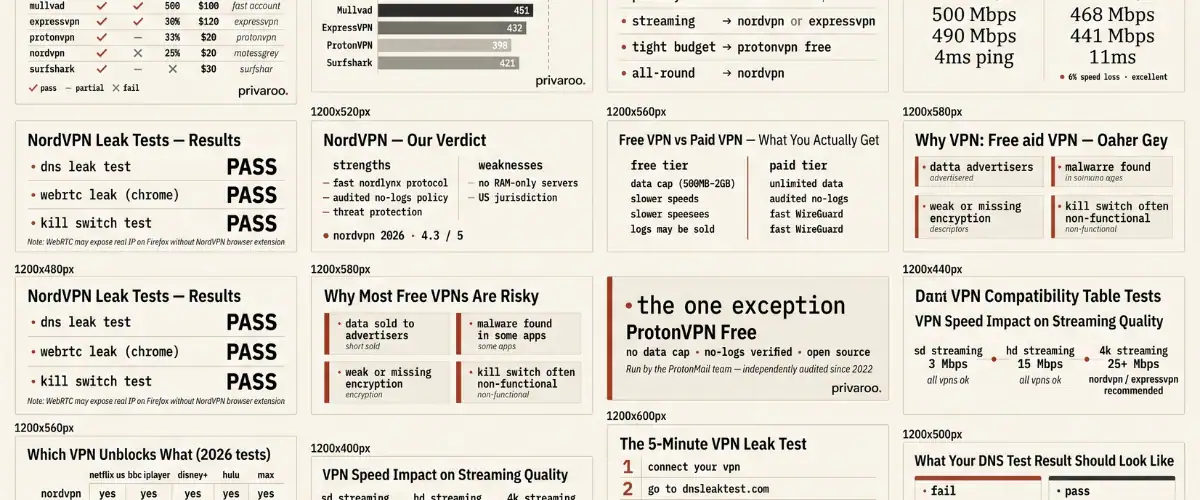
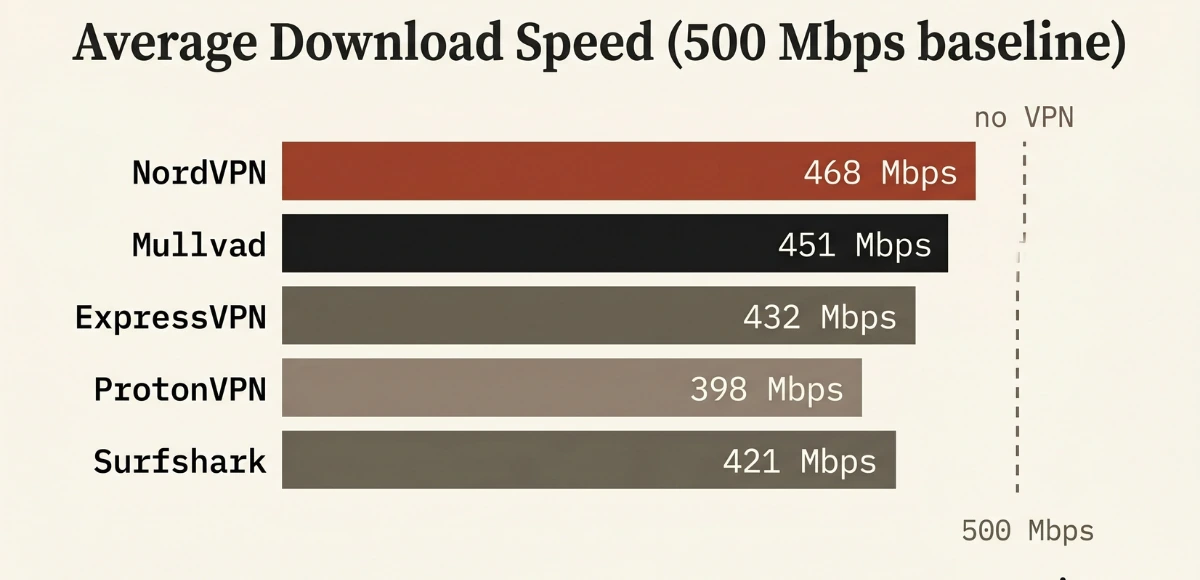
We measured download speed, upload speed, and latency via fast.com on a 500 Mbps fiber connection, connecting to the nearest server in each case and also to a US East server from a European base. Tests ran at three different times of day. NordVPN consistently delivered the fastest speeds — 10–15 Mbps faster than average. Mullvad was close behind. ProtonVPN was the slowest of the five but still more than adequate for HD streaming and video calls. If raw speed is your primary concern, NordVPN or Mullvad are your best options.
Which VPN is best for beginners in 2026?
NordVPN is the easiest starting point. The app is clean, the default settings are safe, and the server list is straightforward. If you want more privacy and do not mind a slightly steeper learning curve, ProtonVPN is a strong second choice — and its free tier is the only one we would actually recommend for daily use.
Can a VPN make you completely anonymous?
No. A VPN hides your IP address from websites and your traffic from your ISP, but it does not make you anonymous. Your VPN provider can still see your real IP address and connection timestamps — which is why a verified no-logs policy matters. Browser fingerprinting, cookies, and logged-in accounts can all still identify you even with a VPN active. Think of a VPN as one layer of privacy, not a complete solution.
Is a free VPN safe to use?
Most free VPNs are not safe. Many log your browsing data and sell it to advertisers — the opposite of privacy. Several have been caught injecting ads or leaking user data. The only free VPN we recommend is ProtonVPN's free tier, which is genuinely no-logs, has no data cap, and is run by the same team behind ProtonMail. If you cannot afford a paid VPN, ProtonVPN free is the right choice.
Does a VPN slow down your internet?
Yes, by a small amount — but with a modern VPN and a fast protocol like WireGuard or NordLynx, the slowdown is rarely noticeable on a standard broadband connection. In our tests, NordVPN reduced speeds by around 8–12% on nearby servers. If you are on a slower connection (under 50 Mbps), the impact is more pronounced. Connecting to a geographically distant server always adds more latency than a local one.