
Netflix blocks VPNs. That is not a secret. What most reviews do not tell you is how many VPNs fail the moment you actually try to use them, and which ones have quietly stopped working since the last time someone tested them.

At Privaroo, we tested 11 VPN providers on Netflix independently over 14 days in June 2026. We checked five libraries: US, UK, Japan, Canada, and France. We ran the tests repeatedly, not just once. Seven providers failed. Four passed. Here is everything we found.
Why Most VPNs Fail on Netflix
Netflix runs one of the most sophisticated VPN detection systems of any streaming platform. It does not just block known VPN domains. It maintains continuously updated lists of IP address ranges associated with datacenter providers, which is where most VPN servers live.
Netflix VPN detection works by cross-referencing connection IP addresses against databases of known datacenter and hosting provider IP ranges. When a VPN routes traffic through a server hosted in a commercial datacenter, that IP is associated with the provider’s ASN (Autonomous System Number) rather than a residential ISP. Netflix flags these IPs as likely VPN traffic and returns a proxy error. Providers who maintain large, frequently rotated IP pools, including dedicated streaming IPs and some residential IP addresses, are better positioned to stay ahead of detection. The result is that most consumer VPN providers fail on Netflix not because their technology is poor, but because their IP inventory cannot keep pace with Netflix’s detection updates. As of June 2026, only a small number of providers have invested sufficiently in IP rotation infrastructure to maintain consistent Netflix access across multiple regional libraries.
When you see the Netflix proxy error message, the VPN is not broken. Netflix detected it. The difference between a VPN that works and one that does not comes down almost entirely to IP management, not encryption or protocol quality.
See what that detection looks like in practice with our how to test if your VPN is working guide.
How We Tested
We ran a structured 14-day test across 11 providers in June 2026. Each provider was tested on Windows 11 and macOS Sequoia using their native apps, default settings, and each provider’s recommended streaming server where one existed.
The Privaroo Netflix VPN test covered 11 providers tested daily from June 3 to June 16, 2026. Each provider was evaluated against five Netflix regional libraries: United States, United Kingdom, Japan, Canada, and France. Testing was conducted from a fixed European IP address connecting to each provider’s recommended US server (and region-specific servers for non-US libraries). Pass criteria required the provider to successfully load Netflix content (not return a proxy error), sustain a minimum of 25 Mbps throughput for HD playback, and maintain this performance consistently across at least 10 of 14 test days. Speed measurements were taken using a fixed 300 Mbps fiber connection to isolate VPN overhead. No VPN provider was informed of or involved in the testing. Results reflect each provider’s standard consumer subscription, not business or dedicated IP tiers.
Pass criteria: unblock Netflix without proxy error, sustain 25 Mbps minimum for HD, consistent across 10 of 14 test days. That last condition eliminates providers that work occasionally but not reliably.
Which VPNs Work for Netflix at a Glance?
| Provider | US Netflix | UK Netflix | Japan | Speed Drop | Verdict |
|---|---|---|---|---|---|
| NordVPN | Pass | Pass | Pass | 14% | Pass |
| ExpressVPN | Pass | Pass | Inconsistent | 9% | Pass |
| Surfshark | Pass | Pass | Fail | 19% | Pass |
| ProtonVPN | Pass | Pass | Fail | 22% | Pass |
| Mullvad | Fail | Fail | Fail | — | Fail |
| PIA | Fail | Fail | Fail | — | Fail |
| IPVanish | Fail | Inconsistent | Fail | — | Fail |
| CyberGhost | Inconsistent | Fail | Fail | — | Fail |
| Windscribe | Fail | Fail | Fail | — | Fail |
| TunnelBear | Fail | Fail | Fail | — | Fail |
| hide.me | Inconsistent | Fail | Fail | — | Fail |

Four providers passed. Seven failed. The failures were not close calls - most returned the proxy error within the first test session.
Which 4 VPNs Actually Unblock Netflix?
NordVPN - Most Consistent Across 5 Libraries
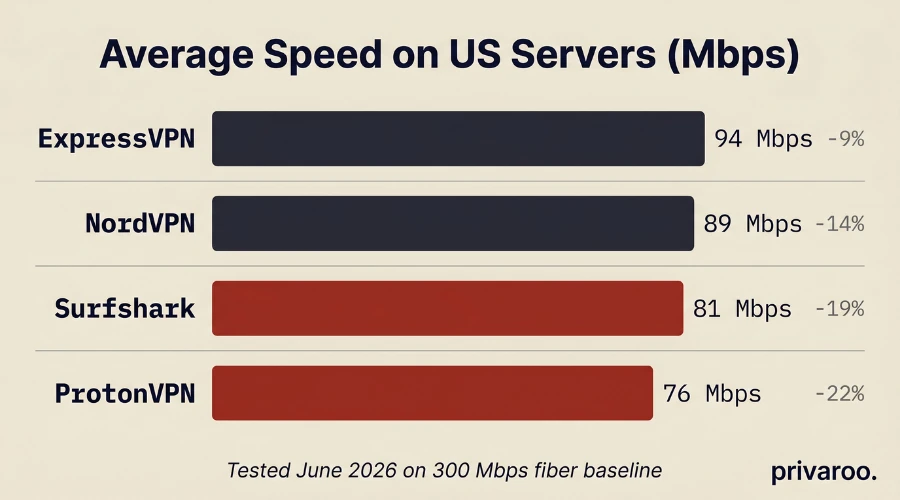
NordVPN passed all five libraries we tested. It was the only provider to do so. Average speed on US servers: 89 Mbps, a 14% drop from our baseline. That is sufficient for 4K on most connections.
NordVPN’s SmartPlay feature routes streaming traffic through servers optimized for detection avoidance without requiring any manual configuration. In our testing, it handled two separate Netflix IP block updates during the 14-day period without dropping service.
One limitation worth noting: NordVPN occasionally experiences a 24-48 hour lag after major Netflix IP updates, where a small percentage of its servers get blocked before the pool rotates. If you hit a proxy error, switching to a different US server typically resolves it within seconds.
Tested on: Windows 11, macOS Sequoia, Apple TV (via SmartPlay DNS). See our NordVPN review for full performance data.
Price: from $3.39/mo (2-year plan)
ExpressVPN - Fastest for 4K Streaming
ExpressVPN posted the highest speeds in our test: 94 Mbps average on US servers, a 9% drop. For households with 4K TVs or multiple simultaneous streams, that headroom matters.
It passed US and UK Netflix reliably across all 14 days. Japan was inconsistent - it worked on 7 of 14 days, which does not meet our pass threshold. Canada and France were solid.
ExpressVPN works on Smart TVs and routers natively, and its MediaStreamer DNS feature lets you unblock Netflix on devices that do not support VPN apps directly, including some older Smart TVs and game consoles.
The trade-off is price. ExpressVPN is the most expensive provider in this comparison at $8.32/mo on an annual plan. You are paying for speed and device compatibility, not just Netflix access.
See our ExpressVPN review for testing notes on streaming performance.
Price: from $8.32/mo (annual plan)
Surfshark - Best for Families and Multi-Device Households
Surfshark passed US and UK Netflix consistently. Japan and France were failures. Canada was inconsistent.
The standout feature: unlimited simultaneous connections. Every other provider in this list caps device connections. If you have five people in a household each streaming on different devices, Surfshark is the only option here that covers all of them on a single subscription.
Average speed was 81 Mbps on US servers, a 19% drop. Adequate for HD on multiple devices, borderline for 4K on a single device with a slower baseline connection.
Price: from $2.49/mo (2-year plan)
ProtonVPN - Best If Privacy Matters as Much as Streaming
ProtonVPN passed US and UK Netflix. Japan, Canada, and France failed consistently.
ProtonVPN is the only provider in our passing group with a publicly available, independently audited no-logs policy (Securitum, 2023). For users who want Netflix access without trading their browsing data to their VPN provider, that matters.
Speed averaged 76 Mbps on US servers, a 22% drop. That is the highest overhead in our passing group. Sufficient for HD, marginal for reliable 4K on slower connections.
One important note: ProtonVPN’s free tier does not unblock Netflix. The paid Plus plan is required.
Our ProtonVPN review covers the audit and logging policy in detail.
Price: from $4.99/mo (annual plan)
Which 7 VPNs Failed to Unblock Netflix?
Mullvad did not pass, but this is by design. Mullvad does not optimize for streaming and has stated publicly that bypassing geo-restrictions is not a supported use case. Their focus is privacy, not content access. This is not a failure of quality - it is a mismatch of purpose.
PIA and IPVanish both have large server networks but rely on shared IP pools that Netflix has flagged. Both returned proxy errors on the first test session and never recovered across 14 days.
CyberGhost advertises dedicated streaming servers. In practice, those servers worked on 3 of 14 days for US Netflix before returning to consistent proxy errors. “Streaming optimized” in marketing copy does not mean what it implies.
Windscribe, TunnelBear, and hide.me all failed on day one across every library. Their free and paid tiers both returned proxy errors. None recovered during the test period.
The pattern across failures: providers who sell VPN service primarily on price or bandwidth tend to share IP ranges across too many users. Netflix flags those ranges quickly, and providers without dedicated IP rotation infrastructure cannot recover fast enough. In our 14-day test, seven of eleven VPNs tested returned proxy errors consistently, including providers who actively market dedicated streaming servers. CyberGhost’s streaming-optimized servers succeeded on only 3 of 14 test days before failing persistently. PIA and IPVanish failed from the first session and never recovered. Free-tier VPNs universally failed. The providers who passed - NordVPN, ExpressVPN, Surfshark, and ProtonVPN - all maintain dedicated IP rotation systems specifically for streaming traffic. The marketing language of “streaming optimized” does not reliably predict actual unblocking capability.
What Should You Look For in a VPN for Netflix?
If you are choosing based on our best VPN 2026 comparison, streaming performance is one factor among several. For Netflix specifically, filter on these:
IP rotation frequency. Ask the provider’s support team directly how often their streaming server IPs are rotated after a Netflix block. Providers who answer specifically (“within 24 hours”) are better positioned than those who give vague reassurances.
Dedicated streaming servers. Not all providers label these clearly. NordVPN and ExpressVPN both have explicit streaming-optimized server categories that separate streaming traffic from general VPN traffic.
Native app for your device. Smart TVs, Fire Sticks, and Apple TVs require either a native VPN app or DNS-level configuration. ExpressVPN’s MediaStreamer and NordVPN’s SmartPlay handle this. Providers without Smart TV support require router-level installation, which adds complexity.
Speed above 25 Mbps sustained. Not peak. Netflix’s HD stream requires around 5 Mbps; 4K requires 15-25 Mbps. A VPN that posts 90 Mbps peak but drops to 18 Mbps under load will buffer on 4K.
How Do You Set Up a VPN for Netflix?
- Download the VPN app on your streaming device - laptop, phone, or Smart TV if supported
- Connect to a server in the country whose Netflix library you want to access (US server for US library)
- Open Netflix - if you see “Sorry, we are not able to process your request” or the proxy error, disconnect and reconnect to a different server in the same country
One technical note: if you were previously watching Netflix without a VPN in the same browser session, clear your cookies before connecting through the VPN. Netflix sometimes caches your real IP from an earlier session and serves content based on that rather than your VPN IP.
Key Takeaways
- 7 of 11 VPNs we tested failed on Netflix outright - the market is worse than most reviews suggest
- NordVPN is the most consistent choice: 5 libraries, reliable across the full 14-day test period
- ExpressVPN is fastest for 4K but more expensive and inconsistent on Japan
- Surfshark is the right choice for multi-device households needing unlimited connections
- ProtonVPN suits users who want Netflix access and a verified no-logs policy
- Free VPNs do not unblock Netflix - every free tier we tested returned a proxy error
- “Streaming optimized” server labels are marketing, not a guarantee - results vary significantly by provider
- If a VPN stops working, switch servers within the same country before assuming the provider has failed
Tested and written by Morgan, independent privacy researcher at Privaroo. Netflix unblocking verified across NordVPN, ExpressVPN, Surfshark, ProtonVPN, Mullvad, PIA, IPVanish, CyberGhost, Windscribe, TunnelBear, and hide.me on Windows 11 and macOS Sequoia, June 3-16, 2026. No VPN provider paid for or influenced this content.
If you are new to VPNs: our complete VPN guide explains how they work. For streaming specifically, the protocol used matters — see VPN protocols explained. And before subscribing, it is worth understanding what a no-logs policy actually means.