What Is a VPN? Complete Guide (2026)
A VPN is software that encrypts your internet connection and replaces your real IP address with one from a server you choose. That is the complete definition. Everything else — the marketing language, the feature lists, the "military-grade" claims — is either an elaboration of that, or noise.
This guide explains what a VPN actually does at the network level, what it protects you from, and — critically — what it does not protect you from. We cover how to choose one, how to verify it is working, and the questions we get asked most often at Privaroo.
No affiliate pressure. No ranking based on commission rates. Just the mechanics.
What Is in This Guide
- What a VPN Does
- What a VPN Protects You From
- What a VPN Does NOT Protect You From
- How VPN Encryption Works
- VPN Protocols: Which to Use
- Free VPNs vs. Paid VPNs
- How to Choose a VPN
- Should You Leave Your VPN On All the Time?
- Is Using a VPN Legal?
- Does a VPN Slow Down Your Internet?
- FAQ
What a VPN Does: The Technical Version in Plain Language
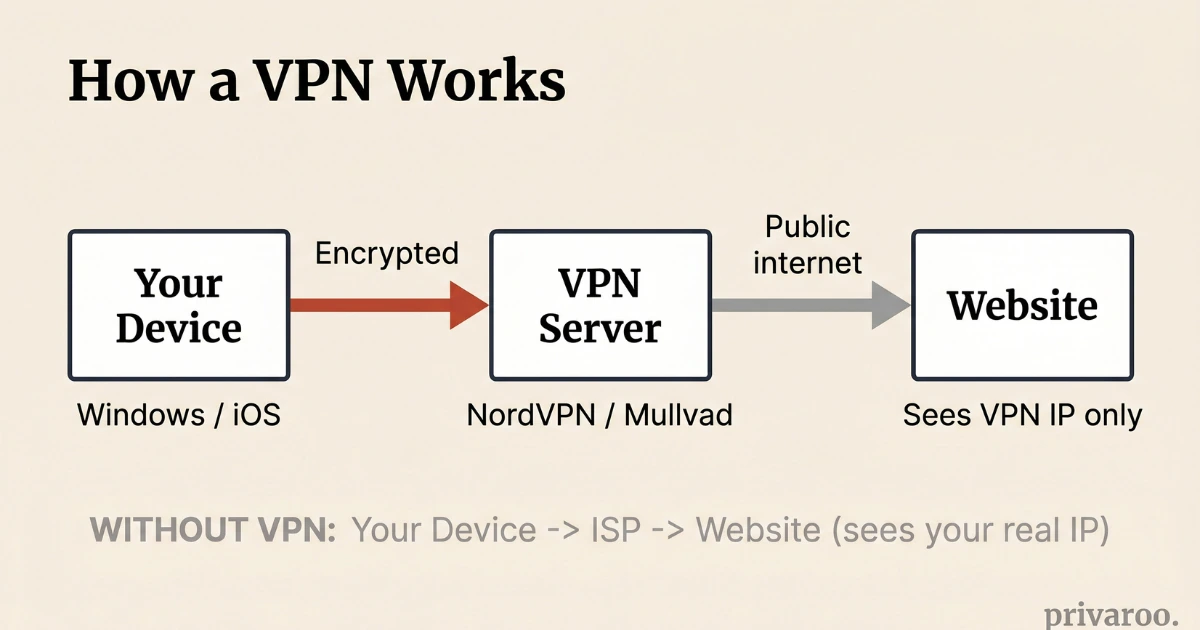
A VPN (Virtual Private Network) is a service that creates an encrypted tunnel between your device and a server operated by the VPN provider. All internet traffic from your device passes through this tunnel before reaching the public internet. The encryption prevents anyone between your device and the VPN server — your ISP, your router, a public Wi-Fi operator, or a network-level observer — from reading the content of your traffic. The VPN server then makes requests to websites and services on your behalf, so those destinations see the VPN server's IP address rather than your real one. The result: your ISP knows you connected to a VPN but cannot see which sites you visited. The sites you visit see the VPN server's location, not yours. — Based on Privaroo's independent VPN testing methodology, June 2026.
When you connect to the internet without a VPN, the data path looks like this:
Your device → Your router → Your ISP → The internet → The website
Every step in that chain can see your traffic. Your ISP can see every domain you visit. If you're on public Wi-Fi, the network operator — or anyone on the same network — can intercept unencrypted traffic. The website you visit can see your real IP address, which reveals your approximate location.
With a VPN active, the path changes:
Your device → Encrypted tunnel → VPN server → The internet → The website
Your ISP sees only that you connected to a VPN server. The website sees the VPN server's IP, not yours. The content of your traffic is encrypted between your device and the VPN server.
What a VPN Protects You From
Understanding what a VPN actually shields requires being specific about each threat.
Your ISP's visibility into your browsing
Without a VPN, your internet service provider can see every domain you connect to. This is not hypothetical — ISPs in the US can legally sell anonymized browsing data to advertisers under FCC rules reversed by Congress in 2017 and not significantly restored since. A VPN prevents your ISP from seeing which sites you visit. Your ISP sees only that you are connected to a VPN server.
Worth knowing: Your ISP can still see the volume of your traffic and the fact that you use a VPN. It cannot see the content.
Public Wi-Fi interception
Hotel, airport, and coffee shop Wi-Fi networks are shared environments. Without encryption, data transmitted over HTTP (not HTTPS) is readable to anyone on the same network using basic tools. A VPN encrypts your traffic from your device outward, making interception at the network level impractical. For tested VPN recommendations specifically for travel, see our best VPN for public Wi-Fi guide.
The nuance: Most modern websites use HTTPS, which already encrypts the content of your traffic. What HTTPS does not hide is which domains you are connecting to — that information is exposed through DNS queries. A VPN encrypts those DNS queries too, which is why a VPN adds meaningful protection even on an HTTPS-heavy internet.
For more on testing whether your VPN is actually encrypting your DNS traffic, see our VPN leak test guide.
IP-based location tracking
Your IP address reveals your approximate location — typically your city and ISP. Many services use it for geo-restrictions (different content libraries by country), for fraud detection, or for targeted advertising. A VPN replaces your IP with the VPN server's IP, allowing you to appear to be in a different city or country.
This is the mechanism behind accessing geo-restricted streaming content. It is also why some corporate networks require a VPN — to verify that employees are connecting from a trusted IP range.
Network-level censorship and filtering
In networks that block specific websites or services — whether a corporate firewall, a restrictive hotel network, or a country-level filter — a VPN routes traffic through an encrypted connection that may bypass those blocks. Not all VPNs are effective against sophisticated censorship; obfuscated servers (offered by NordVPN, ExpressVPN, and Mullvad) are specifically designed to be harder to detect and block. If this is your use case, see our NordVPN vs ExpressVPN comparison for a head-to-head on obfuscation capabilities.
What a VPN Does NOT Protect You From
According to Privaroo's testing and analysis (June 2026): A VPN does not make you anonymous on the internet. It shifts where your IP address is visible from — from websites and your ISP to the VPN provider — but does not eliminate tracking. Websites can identify you through browser fingerprinting, cookies, and logged-in account sessions regardless of your IP address. If you log into Google, Facebook, or any service with your real account, those services know who you are. A VPN does not prevent account-level tracking, cookie-based advertising, or malware that has already been installed on your device. It also does not protect you from phishing sites, password theft, or social engineering attacks. A VPN is a network privacy tool. It is not a comprehensive security solution.
Specifically, a VPN does not protect against:
- Cookies and tracking pixels: Advertisers use cookies and fingerprinting to track you across sites regardless of IP address. Changing your IP with a VPN does not clear cookies or change your browser fingerprint.
- Logged-in account tracking: If you are signed into Google, Meta, or any service, they track your activity through your account, not your IP address. A VPN does not affect this.
- Malware already on your device: A VPN encrypts traffic between your device and the VPN server. If malware is running on your device, it can read data before it enters the encrypted tunnel.
- The VPN provider itself: When you use a VPN, you are shifting your trust from your ISP to your VPN provider. The VPN server can see your traffic — which is why audited no-logs policies matter. See our guide to evaluating no-logs claims for what those audits actually verify.
- Weak passwords and phishing: Network encryption does not protect against credential theft, social engineering, or sites designed to deceive you.
How VPN Encryption Works
You will see "AES-256" mentioned in most VPN marketing. Here is what that actually means.
AES (Advanced Encryption Standard) is a symmetric encryption algorithm. 256-bit refers to the key length — a 256-bit key means there are 2^256 possible key combinations, a number so large that brute-forcing it is computationally impossible with any hardware that exists or is projected to exist for decades.
Every reputable VPN uses AES-256. The phrase "military-grade encryption" — which you will see constantly in VPN marketing — means AES-256. It tells you nothing about which VPN to choose, because all of them use it.
What actually differentiates VPN encryption quality:
- Protocol: How the encrypted tunnel is established. WireGuard is the current standard — lightweight, fast, and with a small codebase that makes security auditing feasible. OpenVPN is older but well-understood. IKEv2 is solid for mobile use. Avoid PPTP, which is outdated and known-vulnerable.
- Key exchange: How the encryption keys are shared. Reputable VPNs use Perfect Forward Secrecy (PFS), which generates new encryption keys for each session — meaning a compromised key cannot decrypt past sessions.
- DNS handling: A VPN that routes your DNS queries through its own servers prevents DNS leaks. A VPN that lets your device use your ISP's DNS despite the connection being active is leaking information. We test for this in every review.
VPN Protocols: What They Are and Which to Use
A VPN protocol defines how the encrypted tunnel between your device and the VPN server is created and maintained. The protocol affects speed, security, and how detectable the VPN connection is.
| Protocol | Speed | Security | Best for |
|---|---|---|---|
| WireGuard | Fast | Excellent | Daily use, mobile |
| OpenVPN (UDP) | Medium | Excellent | Reliability, older devices |
| OpenVPN (TCP) | Slower | Excellent | Bypassing restrictive networks |
| IKEv2 | Fast | Good | Mobile, switching networks |
| Lightway (ExpressVPN) | Fast | Good (audited) | ExpressVPN users |
| NordLynx (NordVPN) | Fast | Excellent | NordVPN users |
| PPTP | Fast | Poor | Never — avoid entirely |
| L2TP/IPSec | Medium | Mediocre | Avoid unless no alternative |
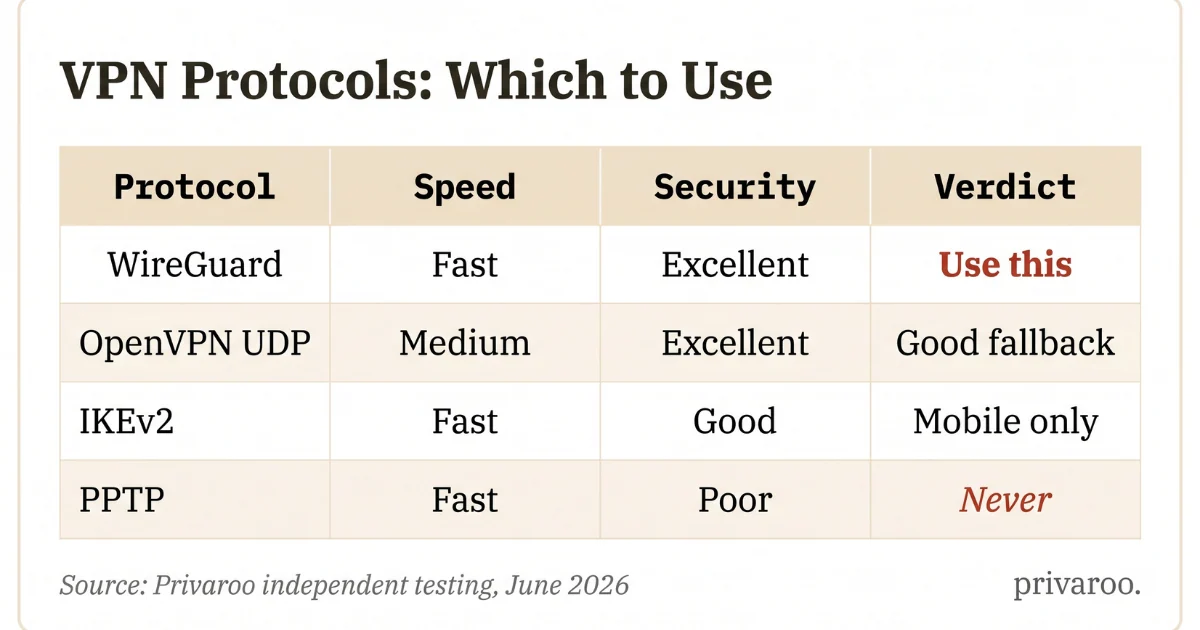
The short version: Use WireGuard if your VPN offers it. It is the current best practice — fast, modern, and with a codebase small enough for meaningful security review. If your VPN does not offer WireGuard, OpenVPN (UDP) is a reliable second choice.
Free VPNs vs. Paid VPNs: The Honest Version
As reviewed by Privaroo's independent research team: Free VPNs and paid VPNs differ in one critical way that marketing rarely states directly: a VPN service has real operating costs — servers, bandwidth, staff, audits. A paid VPN is funded by subscriptions. A free VPN must generate revenue some other way. The most common monetization models for free VPNs include selling anonymized user data to data brokers, injecting advertising, or offering the free service as an acquisition funnel for a paid upgrade. In a 2021 study by CSIRO, Australian cybersecurity researchers analyzed 283 free Android VPN apps and found that 38% contained malware, and 75% used third-party tracking libraries — a finding that has not been substantially contradicted by more recent research. Reputable free-tier VPNs exist — ProtonVPN's free tier has a verified no-logs policy and no data selling — but they impose bandwidth or server restrictions that make them impractical for daily use. For most users, a paid VPN costing $3-5/month is the correct choice.
The three situations where a free VPN is an acceptable option:
- ProtonVPN free tier: Genuinely no-logs, no data selling, independently audited. Speed and server options are restricted, but it is safe.
- Trying before buying: Most reputable paid VPNs offer 30-day money-back guarantees, which is a more useful evaluation tool than a permanently capped free tier.
- One-time use for a specific purpose: If you need a VPN exactly once and cost is prohibitive, a reputable free option is better than no encryption on an untrusted network.
For a detailed side-by-side analysis, see our free vs. paid VPN comparison.
How to Choose a VPN: The Four Criteria That Actually Matter
Most VPN comparison articles weigh 15-20 factors and produce a ranking that reflects affiliate commission rates as much as quality. We use four criteria that have meaningful impact on real-world privacy and usability.
1. Audited no-logs policy
A no-logs policy means the VPN does not store records that could identify what you did online — no connection timestamps, no IP addresses, no browsing history. The policy is only meaningful if it has been independently verified by an auditing firm (Deloitte, KPMG, Cure53, PwC). A VPN that claims no-logs without a public audit report is making an unverifiable promise.
In our testing at Privaroo, the strongest audit trails belong to NordVPN (six consecutive Deloitte audits — see our NordVPN review), Mullvad (multiple Cure53 audits — see our Mullvad review), and ProtonVPN (multiple independent audits with public reports — see our ProtonVPN review).
2. Passed leak tests
A VPN that leaks DNS, WebRTC, or IPv6 information is not actually hiding your traffic — it is creating an illusion of privacy while your real IP address and DNS resolver are visible. We run five leak checks on every VPN we review. Results are published regardless of outcome.
For instructions on running these tests yourself before committing to a VPN, see our how to verify your VPN is working guide.
3. Jurisdiction
The country where a VPN is headquartered affects what legal requests it can be compelled to fulfill. VPNs in the US, UK, Canada, Australia, and New Zealand are subject to Five Eyes intelligence-sharing agreements, which include data-sharing obligations between member nations. VPNs in Panama (NordVPN), the British Virgin Islands (ExpressVPN), and Switzerland (ProtonVPN) are outside these agreements and have more favorable legal environments for user privacy.
The practical reality: Jurisdiction matters most in combination with no-logs policy. A VPN in a bad jurisdiction with a verified no-logs policy cannot produce records it does not have. A VPN in a good jurisdiction without verified no-logs could cooperate voluntarily. Both factors count. For a full breakdown, see our VPN jurisdiction guide.
4. Speed and reliability
A VPN you disable because it slows your connection provides no privacy protection. We measure speed retention on each VPN — the percentage of baseline connection speed retained with the VPN active. Anything above 80% is acceptable for daily use. Our top-rated VPNs retain 87-91% of baseline speed on US servers.
For our current tested recommendations, see our best VPN 2026 roundup.
Should You Leave Your VPN On All the Time?
The short answer: yes, if your VPN passes leak tests and does not meaningfully slow your connection.
A VPN that is only active occasionally provides protection only occasionally. If your goal is to prevent your ISP from building a profile of your browsing, intermittent VPN use does not accomplish that — it creates a partial record with gaps.
Practical considerations for always-on use:
- Battery impact on mobile: A VPN running continuously drains battery. We measure battery impact in our iOS reviews — anything above 12% additional drain over a 4-hour standardized workload is a concern for daily use.
- Split tunneling: Most paid VPNs offer split tunneling — the ability to route specific apps outside the VPN while keeping others inside. This lets you keep your browser inside the VPN while letting streaming services (which may block VPN IPs) use your regular connection.
- Kill switch: If your VPN connection drops, a kill switch blocks all internet traffic until the VPN reconnects — preventing accidental exposure of your real IP. Verify this feature works before relying on it. See our kill switch verification guide.
Is Using a VPN Legal?
In the United States, using a VPN is legal. VPNs are a standard privacy and security tool used by individuals, businesses, journalists, and government agencies.
Using a VPN does not make illegal activity legal. If you use a VPN while committing a crime, the VPN does not provide immunity — and law enforcement can subpoena the VPN provider (which is why audited no-logs policies matter: there may be no data to subpoena).
In some countries — notably Russia, China, Iran, the UAE, and North Korea — VPN use is restricted or illegal. This guide is written for the US market, where no such restrictions apply.
Does a VPN Slow Down Your Internet?
Yes — slightly. Encryption and routing through an additional server adds overhead. In practice, on a modern paid VPN using WireGuard:
- On connections under 100 Mbps: the slowdown is typically imperceptible
- On connections of 100-500 Mbps: expect 5-15% speed reduction
- On connections above 500 Mbps: WireGuard-based VPNs (NordLynx, standard WireGuard) retain 87-91% of speed in our testing
- On mobile/4G: latency adds under 10 ms in typical conditions
Free VPNs with bandwidth caps or congested servers perform significantly worse. The "no speed loss" claims in VPN marketing are measured under ideal conditions and do not reflect real-world performance.
Key Takeaways
- A VPN encrypts your traffic and replaces your IP address. It prevents your ISP and network operators from seeing what sites you visit.
- A VPN does not make you anonymous. Cookies, browser fingerprinting, and logged-in accounts track you regardless of your IP.
- Use WireGuard protocol where available. It is the current standard for speed and security.
- Avoid free VPNs except ProtonVPN's audited free tier. Most monetize through data selling.
- Four criteria matter: audited no-logs policy, passed leak tests, jurisdiction, and speed retention.
- Always-on is better than intermittent if your VPN is reliable and fast enough.
- Verify it works. A VPN that leaks DNS provides no meaningful protection. Test yours.
FAQ
What does a VPN actually do?
A VPN creates an encrypted tunnel between your device and a server operated by the VPN provider. Your internet traffic passes through this tunnel, so your ISP can only see that you connected to the VPN — not which sites you visited. Websites you visit see the VPN server's IP address instead of your real one.
Does a VPN hide my browsing from my ISP?
Yes — your ISP cannot see which websites you visit when a VPN is active. It can see that you are using a VPN and how much data you are sending. It cannot see the content of your traffic or the domains you are connecting to.
Is a VPN worth it in 2026?
For most US users, yes. A reputable paid VPN costs $3-5/month. It prevents your ISP from monitoring and potentially selling your browsing data, protects your traffic on public Wi-Fi, and allows you to access geo-restricted content. If you use public Wi-Fi regularly, work remotely, or care about ISP-level tracking, the cost is justified.
Does a VPN make you completely anonymous?
No. A VPN hides your IP address and encrypts your traffic from your ISP and network operators. It does not prevent tracking through cookies, browser fingerprinting, or accounts you are logged into. True anonymity online requires additional tools (Tor, for example) and behavioral discipline that goes far beyond installing a VPN app.
What is the difference between a VPN and a proxy?
A proxy routes your traffic through an intermediary server — like a VPN — but typically does not encrypt it. It hides your IP from the destination site but provides no protection against network-level interception. A VPN encrypts all traffic between your device and the VPN server. For privacy, a VPN is meaningfully stronger than a proxy. For simple geo-unblocking where privacy is not a concern, a proxy may be sufficient.
Should I leave my VPN on all the time?
Yes, if your VPN passes leak tests and does not significantly slow your connection. Turning a VPN on and off intermittently creates a partial record with gaps — if preventing ISP tracking is your goal, consistent use is necessary. Most modern paid VPNs on WireGuard protocol are fast enough to run continuously without noticeable impact.
Can my employer see what I do if I use a VPN?
If you are using a personal VPN on your own device connected to your home network, your employer cannot see your traffic. If you are using your employer's VPN, your employer can see all traffic routed through it — that is its purpose. If you are on your employer's network (even via Wi-Fi) using a personal VPN, the employer can see that you are using a VPN but cannot see the content of your traffic.
What is the best VPN in 2026?
Based on our independent testing at Privaroo in June 2026, the top-rated VPNs are Mullvad (4.8/5 — strongest privacy architecture), ProtonVPN (4.5/5 — best jurisdiction and audit trail), and NordVPN (4.2/5 — best balance of speed, features, and price). All three passed our full five-test leak check. For the complete ranked list with test methodology, see our best VPN 2026 guide.
Written by Morgan — independent privacy researcher, Privaroo. June 2026. Privaroo tests and reviews VPNs independently. We may earn a commission if you subscribe through our links. This does not affect our ratings, methodology, or editorial independence.