Both a VPN and Tor hide your real IP address from the websites you visit. That is where the similarity ends.
They work through entirely different architectures, protect against different threats, and are designed for different types of users. Choosing the wrong one for your situation does not just give you suboptimal privacy — it can give you a false sense of security that is more dangerous than using nothing at all. This guide covers how each tool actually works, where each one fails, and how to decide which belongs in your setup.
How a VPN works
A VPN creates an encrypted tunnel between your device and a server operated by the VPN provider. All of your internet traffic passes through that tunnel. From the perspective of your ISP, you are sending encrypted data to the VPN server — nothing more. From the perspective of the websites you visit, your traffic appears to originate from the VPN server's IP address, not your own.
The privacy guarantee of a VPN rests entirely on trusting one entity: the VPN provider. The provider can see your real IP address and, in principle, the timing and volume of your traffic. Whether they log any of this depends on their no-logs policy and how thoroughly it has been audited. A VPN is fast, covers all traffic on your device (not just your browser), and works transparently in the background.
How Tor works
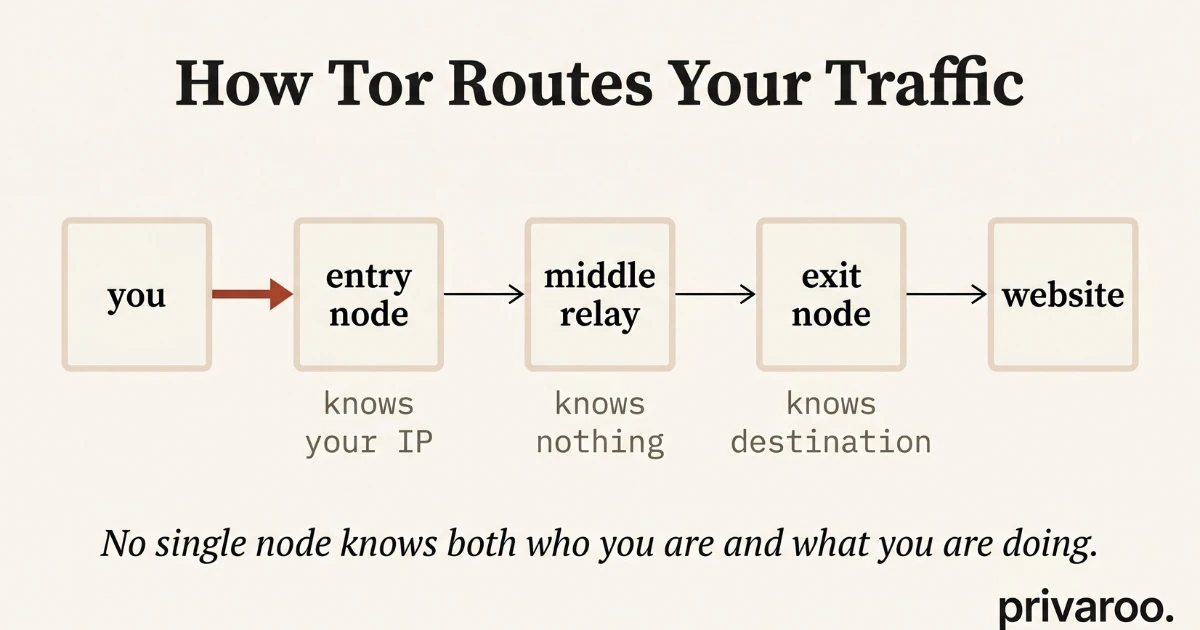
Tor routes your traffic through a chain of three volunteer-operated servers called nodes: an entry node, a middle relay, and an exit node. Each node knows only the IP address of the node immediately before it and the node immediately after it. No single node knows both who you are and what you are doing. This distributed trust model is the core of what makes Tor different from a VPN.
The entry node knows your real IP address but cannot see your destination. The exit node can see your destination but does not know your real IP. No single party has the full picture. This architecture eliminates the single-point-of-trust problem that every VPN carries by design.
VPN vs Tor: side-by-side comparison
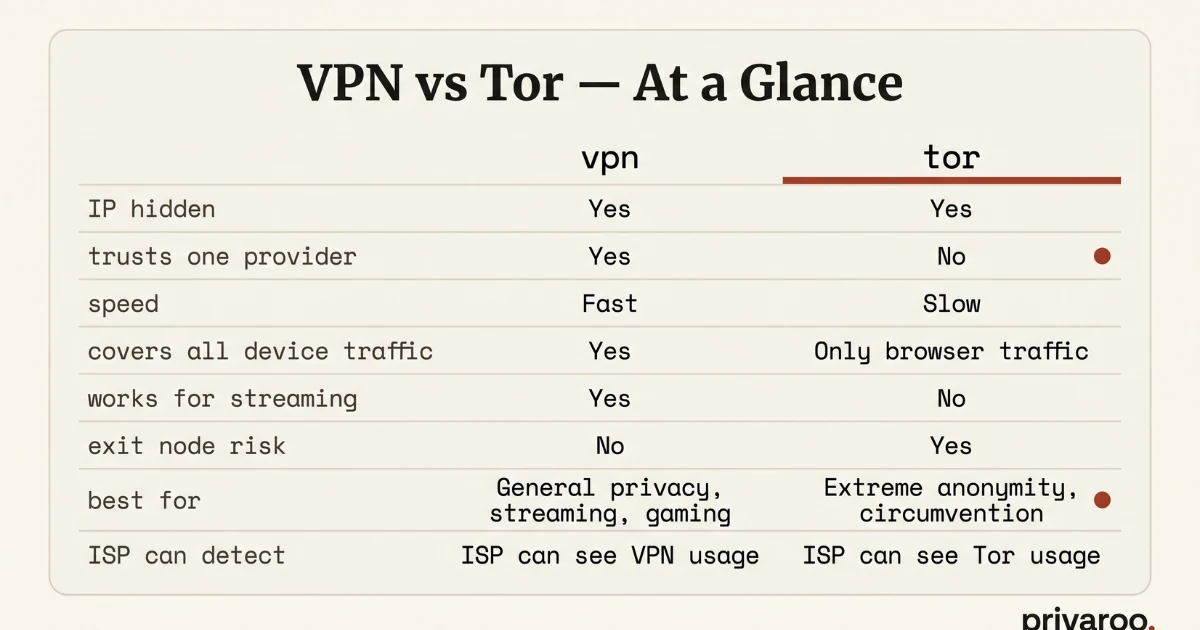
| VPN | Tor | |
|---|---|---|
| IP hidden from websites | Yes | Yes |
| Requires trusting a single provider | Yes | No |
| Speed | Fast (10–15% overhead) | Slow (3 relays) |
| Covers all device traffic | Yes | Browser only |
| Works for streaming | Yes | No |
| Works for torrenting | Yes (with right VPN) | Strongly discouraged |
| ISP can detect use | Yes (unless obfuscated) | Yes (unless bridges used) |
| Exit node risk | None | Yes (on HTTP sites) |
| Best for | Daily privacy, streaming, travel | Maximum anonymity, high-risk use |
Where Tor wins: anonymity without trusting a provider
Tor's distributed trust model means there is no single company that can be subpoenaed, hacked, or pressured into revealing your identity. Even if a government agency seized every Tor relay simultaneously, correlating that data to identify individual users is computationally expensive and requires controlling a significant fraction of the entire Tor network — something no single adversary reliably achieves in practice.
For journalists communicating with sources, whistleblowers, activists in countries with authoritarian surveillance infrastructure, or anyone whose threat model includes a well-resourced state adversary, Tor's architecture provides a level of anonymity that no VPN can match. A VPN provider can always — under sufficient legal or political pressure — hand over whatever data it holds. Tor nodes hold almost nothing.
Where a VPN wins: speed, coverage, and everyday use
Tor routes your traffic through three separate relays, each adding latency. In practice, Tor reduces typical broadband speeds by 80–95%. Streaming video is effectively impossible. File downloads are painfully slow. The Tor Browser also only protects browser traffic — any other app on your device (email client, torrent software, desktop apps) sends its traffic outside the Tor network entirely.
A modern VPN using WireGuard or NordLynx adds roughly 10–15% overhead at most. All device traffic is protected, including apps, system updates, and background services. For the vast majority of privacy use cases — hiding your activity from your ISP, protecting yourself on public Wi-Fi, accessing geo-restricted content, or preventing advertiser tracking — a VPN is the right tool. See our best VPN 2026 guide for tested recommendations.
The Tor exit node problem
Tor's exit node is the point where your traffic leaves the Tor network and connects to its final destination. Anyone can run an exit node — including law enforcement agencies, intelligence services, and malicious actors specifically hunting for sensitive traffic. The exit node operator can see the content of unencrypted HTTP traffic in full. They cannot see your real IP address, but they can see exactly what you are doing.
The practical implication: if you use Tor to visit an HTTPS site, the exit node sees only an encrypted stream — your destination hostname but not the content. If you visit an HTTP site over Tor, the exit node reads your traffic in plaintext. In 2026, HTTPS covers the majority of the web, which significantly reduces but does not eliminate the exit node risk. The rule is simple: never submit passwords, personal data, or anything sensitive over HTTP while using Tor.
Can you use both together?
Yes — and in specific situations, it makes sense. The most practical combination is VPN over Tor (connecting to a VPN while Tor is running), which hides your Tor usage from your ISP and prevents the entry node from seeing your real IP. This configuration is used by journalists and activists who need Tor's anonymity but cannot afford to have their ISP log a Tor connection.
The reverse — Tor over VPN (connecting Tor through a VPN) — is easier to set up but provides less benefit: your VPN provider knows you are using Tor, and you still inherit all of Tor's performance penalties. For most users, the combination adds complexity without meaningful additional protection over using a well-audited no-logs VPN alone.
Which should you choose?
The answer depends entirely on your threat model.
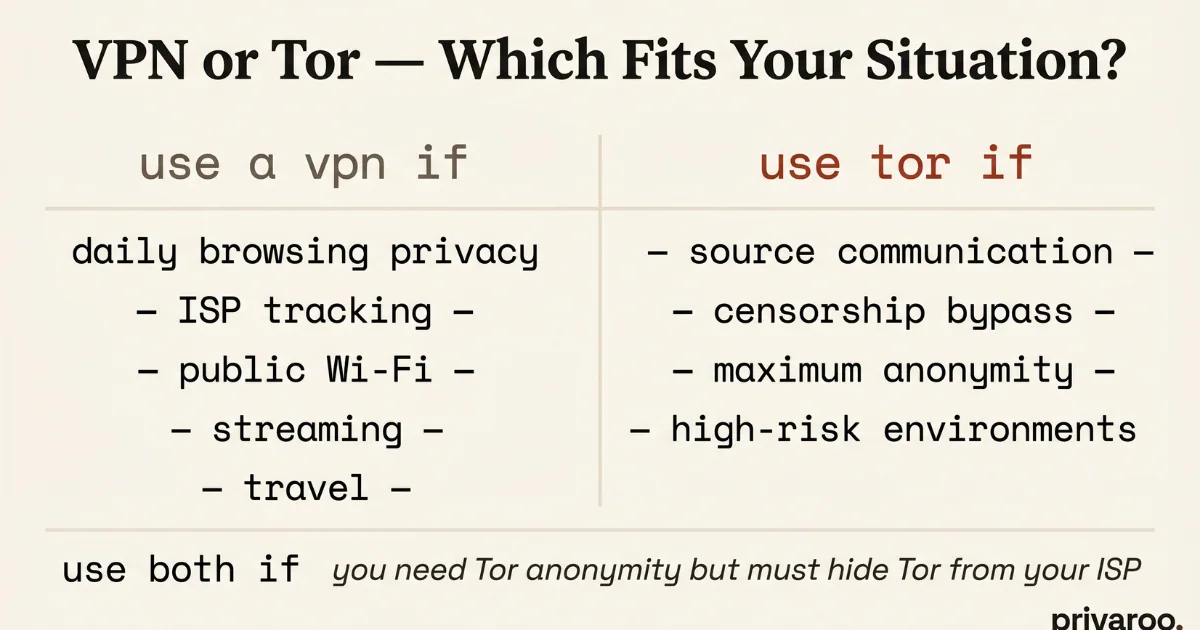
Use a VPN if: You want to protect your daily browsing from your ISP, prevent ad trackers from building a profile on you, secure your connection on public Wi-Fi, access streaming services from another country, or keep your downloads private. A VPN is faster, covers all your traffic, and requires zero behavior change beyond installing an app. For testing your VPN is actually working, our 5-minute leak test covers everything you need.
Use Tor if: You need to communicate anonymously with a source, access information in a country with aggressive internet censorship, or operate in an environment where your VPN provider could be legally compelled to identify you. Tor is the right tool for high-stakes anonymity. It is not the right tool for watching Netflix.
Use both if: You need Tor's anonymity but want to hide your Tor usage from your ISP, or you are operating in a country where connecting to Tor triggers automated surveillance.
Frequently asked questions
Is Tor illegal?
No, in most countries. Tor itself is a legal privacy tool used by journalists, researchers, and privacy-conscious users worldwide. Using Tor to access illegal content or conduct illegal activity is illegal — but the same is true of using a standard browser. In some countries with restrictive internet laws (China, Russia, Belarus), using Tor may be restricted or blocked.
Can the government track you on Tor?
In theory, a sophisticated adversary controlling a large fraction of Tor relays could perform a traffic correlation attack to deanonymize users over time. In practice, this requires significant resources and time. Law enforcement agencies have deanonymized Tor users primarily through operational security mistakes (logging into personal accounts, reusing usernames, malware) rather than breaking Tor's cryptography.
Does a VPN hide you from your ISP?
Yes. Your ISP sees only that you are sending encrypted traffic to a VPN server — not the content of that traffic or which websites you visit. Your ISP does know you are using a VPN. If you need to hide VPN usage from your ISP, use a VPN with obfuscated servers, which disguises VPN traffic as regular HTTPS traffic.
Can I use Tor on my iPhone or Android?
Yes. The Tor Project maintains an official iOS app (Onion Browser) and an Android app (Tor Browser for Android). Both route browser traffic through the Tor network. Neither protects other apps on your device — for full-device protection, a VPN remains the only practical option on mobile.